Multi-Tenant Postgres: Schema-per-Tenant vs Row-Level Security (and How to Migrate Live Tenants)
Schema-per-tenant or row-level security? Compare both for multi-tenant Postgres, choose the right one, and migrate live tenants with no downtime.
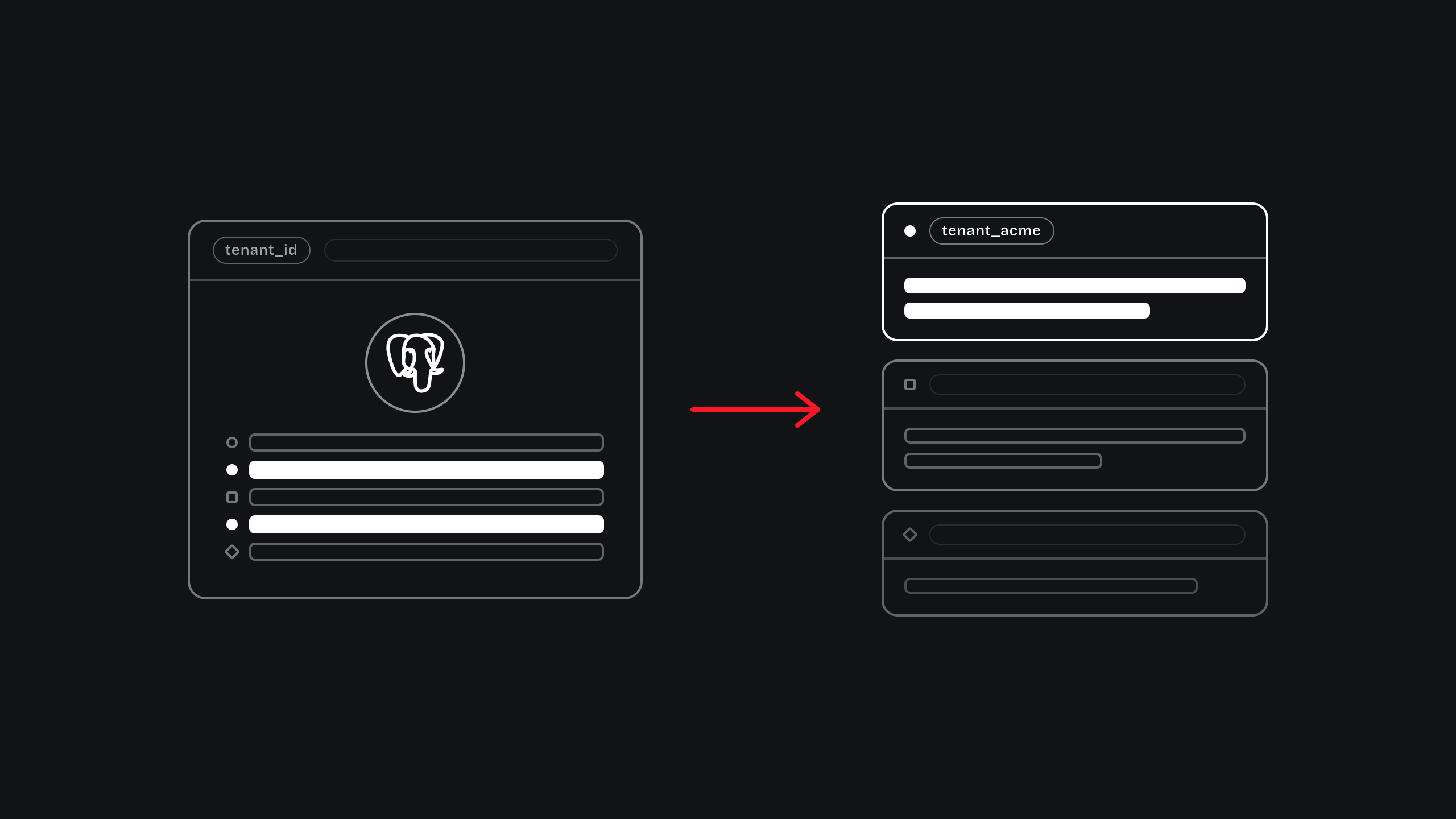
Many small, similar tenants
RLS fits many small, similar tenants: one schema, with isolation enforced by the database.
Fewer, larger tenants
Schema-per-tenant fits fewer, larger tenants that need stronger separation, at the cost of running every migration once per tenant.
A mix of both
A hybrid works when your customers are a mix of both.
One tenant at a time
Migrate one tenant at a time, behind a feature flag, with a rollback plan written first.
The right multi-tenant architecture in Postgres depends on your tenants. Use row-level security (RLS) for many small tenants that share one schema, and schema-per-tenant for fewer, larger tenants that need stronger isolation. Either way, migrate live tenants one at a time behind a feature flag, so every step can be rolled back.
Most SaaS teams meet this decision at an awkward moment. One large customer runs a heavy report and every other customer’s app slows down. Or an enterprise buyer sends a security questionnaire that asks exactly how one customer’s data is kept apart from another’s, and the honest answer is “we remember to add a filter to every query.”
This guide explains both approaches in plain terms, compares them side by side, gives you a way to choose, and then walks through how to migrate tenants who are already live without taking the product down.
How you separate tenants affects performance, security and cost for years, and it gets harder to change as your customer base grows. Whether you are designing a new SaaS product or scaling an existing one, the points below will help you choose with confidence.
01 · What multi-tenancy means, and why it starts to hurt at scale
A tenant is one customer company using your product. Multi-tenant means a single running application and database serves many tenants at once, instead of deploying a separate copy of the product for each one. It is how almost every SaaS product keeps costs and operations manageable.
The model works well early on. It starts to hurt when the product grows, and the pain usually shows up in one of three ways:
- Noisy neighbors
- One tenant with a lot of data or a heavy workload slows queries for everyone sharing the same tables and database.
- Data-leak risk
- If isolation depends on every developer remembering a
WHERE tenant_id = …filter, one forgotten filter in one new query can expose another customer’s data. - Security reviews
- Larger buyers ask how tenant data is isolated, how it can be exported or deleted for one customer, and how access is audited. Vague answers slow down or kill deals.
Postgres gives you several ways to handle this. Which one fits depends on how many tenants you have, how different they are in size, and what your customers’ contracts require.
02 · The three multi-tenancy models in Postgres
There are three common ways to separate tenants in Postgres:

- Shared tables with a
tenant_idcolumn - Every customer’s rows live in the same tables, and each row is tagged with the tenant it belongs to. This is the simplest and cheapest model, and it is the riskiest if the filter is ever forgotten. Row-level security is the safeguard that makes this model safe.
- Schema-per-tenant
- One database, but each tenant gets its own schema, which is a named set of tables. Tenant data is physically separated, though it still runs on the same database server.
- Database-per-tenant
- Each tenant gets a completely separate database. This gives the strongest isolation and the highest cost and operational load, because every database needs its own connections, upgrades and monitoring. It is usually reserved for a small number of very large or highly regulated customers.
This post compares the first two, because they are the ones most growing SaaS teams choose between.
03 · What is row-level security (RLS) in Postgres?
Row-level security (RLS) is a Postgres feature that restricts which rows a query can read or change, based on policies attached to a table. In a multi-tenant app, a policy limits every query to the current tenant’s rows, so the database enforces isolation instead of application code. See the official PostgreSQL documentation on row security policies and the CREATE POLICY reference.
How it works
With RLS, all tenants share the same tables, and Postgres itself decides which rows each query is allowed to see. You attach a rule, called a policy, to a table. After that, every query against that table is automatically limited to the current tenant’s rows, even if the developer who wrote the query forgot to add a filter.

Here is a minimal example. The policy compares each row’s tenant_id to a value your application sets for the current request:
-- Turn on RLS and make it apply to the table owner as well
ALTER TABLE invoices ENABLE ROW LEVEL SECURITY;
ALTER TABLE invoices FORCE ROW LEVEL SECURITY;

-- Only show (and only allow writes to) rows for the current tenant.
-- The 'true' flag makes a missing setting return NULL, so no rows match.
CREATE POLICY tenant_isolation ON invoices
  USING (tenant_id = current_setting('app.tenant_id', true)::uuid)
  WITH CHECK (tenant_id = current_setting('app.tenant_id', true)::uuid);
Then, for each request, your application sets the tenant inside the same transaction as its queries:
BEGIN;
-- The third argument (true) limits the setting to this transaction only
SELECT set_config('app.tenant_id', '3f2a9c1e-5b7d-4e8a-9c21-7d4e5f6a8b90', true);
SELECT * FROM invoices;  -- returns only this tenant's invoices
COMMIT;
Strengths
The database enforces isolation.
Safety no longer depends on every developer remembering a filter in every query.
It scales to many tenants.
Thousands of small tenants live in one set of tables.
One schema to manage.
A change is applied once, not once per tenant.
Pitfalls to plan for
- Roles that bypass RLS
- Superusers and roles with the
BYPASSRLSattribute ignore policies. Table owners also bypass them unless you setFORCE ROW LEVEL SECURITY. Your application should connect as a normal role that owns nothing. - Connection pooling
- If you use a pooler such as PgBouncer in transaction mode, a session-level setting can leak between requests. Set the tenant per transaction, as in the example above.
- Views
- A view runs with its owner’s permissions by default, which can skip RLS. On Postgres 15 and later, create views with
security_invoker = true. - Performance
- The policy adds a condition to every query, so index
tenant_id, and put it first in composite indexes. - Shared resources
- RLS separates what tenants can see, not what they consume. A heavy tenant still competes for the same tables and the same server.
Best fit
RLS suits many small to mid-size tenants with similar data volumes, where you want low operating cost and a single schema.
04 · What is schema-per-tenant in Postgres?
Schema-per-tenant is a multi-tenant design in which each customer gets its own Postgres schema, a named group of tables, inside a shared database. The application routes each request to the right schema, so tenant data is physically separated while still running on one server. See the official PostgreSQL documentation on schemas.
How it works
In this model each tenant gets its own schema inside one database, with its own copy of every tenant table. When a request comes in, the application points the connection at that tenant’s schema using Postgres’s search_path setting, so a query for invoices reads from that tenant’s invoices table only.

-- Create a schema for a new tenant
CREATE SCHEMA tenant_acme;

-- Create the tenant's tables inside it
CREATE TABLE tenant_acme.invoices (
  id uuid PRIMARY KEY,
  amount_cents integer NOT NULL
);

-- For each request, point the transaction at that tenant's schema
BEGIN;
SET LOCAL search_path TO tenant_acme, public;
SELECT * FROM invoices;  -- reads tenant_acme.invoices
COMMIT;
Schema names cannot be passed as ordinary query parameters, so build and validate them in your own code and quote them safely. Never insert a tenant name into SQL as raw text.
Strengths
Clear boundaries.
A tenant’s data sits in its own tables, which is easier to explain to a security team.
Per-tenant operations.
Backing up, restoring, exporting or deleting one tenant is more straightforward than pulling rows out of shared tables.
Easier to move.
A single tenant’s schema can be moved to another database later if it outgrows the shared one.
Pitfalls to plan for
- Migrations run once per tenant
- Every table change must be applied to every schema, so you need tooling that runs changes in batches and reports which tenants failed.
- Catalog growth
- Every tenant adds its own tables and indexes to Postgres’s internal catalog. With thousands of tenants, tools such as
pg_dumpand some maintenance tasks slow down, and you may need to raise settings such asmax_locks_per_transaction. - Pooling and
search_path - As with RLS, set the schema per transaction so one request cannot inherit another’s setting.
- ORM support
- Some ORMs and query builders handle switching schemas per request poorly. Test your stack early.
- Same server
- Separate schemas do not stop one heavy tenant from using up CPU, memory and connections that others share.
Best fit
Schema-per-tenant suits fewer, larger tenants, or buyers whose contracts require stronger separation or per-tenant data handling.
05 · Schema-per-tenant vs RLS: side-by-side comparison
| Factor | Row-level security (shared tables) | Schema-per-tenant |
|---|---|---|
| How data is separated | Rules on shared tables hide other tenants’ rows | Each tenant has its own tables in its own schema |
| Isolation strength | Good, enforced by the database, but one bad policy affects everyone | Stronger, a clear boundary per tenant |
| Number of tenants it suits | Thousands or more | Tens to low thousands |
| Noisy-neighbor risk | Higher, tenants share the same tables | Lower, but the same database server is still shared |
| Schema changes | Run once | Run once per tenant, needs tooling |
| Per-tenant backup or restore | Hard | Easier |
| Operational overhead | Low | Higher as tenant count grows |
| Biggest risk | A missing or bypassed policy, such as table owners | Catalog growth and slow migrations at high tenant counts |
| Best fit | Many small to mid-size tenants | Fewer, larger tenants with strict isolation needs |
A useful rule of thumb: the more tenants you have, and the more alike they are, the more RLS makes sense. The fewer and larger your tenants are, and the stricter their isolation needs, the more schema-per-tenant makes sense.
06 · How to choose: a simple decision framework
Ask these five questions, in this order:
- 01 How many tenants do you have today, and in two years?
- Hundreds or thousands of small tenants point toward RLS. A few dozen large ones keep schema-per-tenant on the table.
- 02 How different are your tenants in size?
- If a handful of customers hold most of the data, you are likely to have noisy-neighbor problems that RLS alone will not fix.
- 03 Do contracts or regulators require stronger isolation?
- If customers ask for per-tenant exports, deletion or data residency, separate schemas or databases are easier to defend.
- 04 How often does your schema change?
- Frequent changes make per-tenant migrations expensive. RLS keeps that cost flat.
- 05 How big is the team that will run it?
- Schema-per-tenant needs migration tooling and monitoring. A small team may be safer with one schema and strong tests.
The answers usually land in one of three places:
Choose RLS
Choose schema-per-tenant
Use a hybrid
Keep the long tail of small tenants on shared tables with RLS, and give your largest accounts their own schema or database.
If the answers pull in different directions, or you cannot measure tenant sizes and query patterns today, that is a sign to get an outside review before you commit. A short audit of the real data usually settles the question faster than debate.
07 · How to migrate live tenants without downtime
The safest migrations are boring. They move one small piece at a time, check the result, and keep the old path alive until the new one is proven. The steps below apply whether you are moving from shared tables to RLS, from shared tables to schema-per-tenant, or between the two.
- Step 01
Audit and map
List every table that holds tenant data, every place the application reads or writes it, and every path that skips the normal request flow: background jobs, reports, admin tools, exports and webhooks. Decide the target model using the framework above. Missed write paths are the most common cause of surprises later.
- Step 02
Prepare the target
For RLS, add a nullable
tenant_idcolumn to each table, then backfill it in small batches so you never hold a long lock on a large table. Build indexes with CREATE INDEX CONCURRENTLY, then enforce the column as required using a constraint you add as NOT VALID and then validate, which avoids blocking writes. For schema-per-tenant, create the new schemas and tables from a single source of truth for your table definitions. - Step 03
Test in shadow mode
Run the new policies or schemas against staging, and against a copy of real production traffic if you can. Check query plans and timings. Nothing here should affect a live customer yet.
- Step 04
Sync the data
While tenants are still live, keep the old and new structures in step. Common options are writing to both places from the application (dual writes), or copying changes automatically with logical replication or change data capture. Choose one and test what happens when a write succeeds in one place and fails in the other.
- Step 05
Verify
For each tenant, compare row counts and checksums between old and new. Then test isolation directly: sign in as one tenant and confirm you cannot read, update or delete another tenant’s data through any path.
- Step 06
Cut over one tenant at a time
Use a feature flag to route each tenant to the new path. Start with an internal test tenant, then a few small, low-risk customers, then widen the rollout. Move the largest tenants last, when the process is proven. The routing check can be as small as this:
// Illustrative: choose the old or new data path per tenant
const useNewPath = await flags.isEnabled("tenant-isolation-cutover", { tenantId });
const db = useNewPath ? newDb : legacyDb;
- Step 07
Keep a rollback plan
Because each tenant sits behind a flag, rolling back means switching that tenant back, not restoring a backup. Write down in advance what triggers a rollback, such as error rate, latency or a failed isolation check, and who decides. Keep writes synced both ways until the tenant has been stable for an agreed period.
- Step 08
Clean up
Only after a stable period, remove the old path, drop unused columns or tables, and update your runbooks and architecture notes so the next engineer understands the decision.
Long locks on big tables, backfills that are not batched, write paths that nobody mapped, and cutting over everything at once. Each of these is avoided by the steps above.
08 · Common mistakes teams make
Choosing a model before measuring tenants.
Look at real tenant sizes, query patterns and growth first. The right answer depends on your data, not on a blog post, including this one.
Relying on application filters alone.
A filter in code is a habit, not a guarantee. Add a database-level guard such as RLS, and write tests that try to read across tenants.
Skipping the rollback plan.
If you cannot switch a tenant back within minutes, the migration is riskier than it looks.
Migrating the biggest tenant first.
Start with internal and low-risk tenants so you learn on cases where a mistake is cheap.
Forgetting the side doors.
Background jobs, reports, admin panels and data exports often bypass the normal request path, and they are where isolation gaps hide.
Treating isolation as a one-time project.
New tables and new features need the same protection. Make tenant isolation part of code review and automated tests.
09 · What we see when teams come to us
The teams we work with are usually past product-market fit. Growth is real, and one system, often tenant isolation, billing or onboarding, has started to break under production load. A shared-everything schema that let one tenant’s load degrade another’s is a pattern we meet again and again.
We don’t start by picking a model. We start with a two-week systems audit: two senior engineers read your codebase, interview your team and trace the system you are worried about under real production data. You get a written findings document that ranks issues by risk and effort, whether or not you hire us afterward. If the work is worth doing, we move tenants to schema-per-tenant or row-level security and migrate live tenants with no downtime, staged behind flags with a rollback plan.
You can see how we work with SaaS teams on our case studies page.
Frequently asked questions
It is a design where one database serves many customers, called tenants, while keeping their data separate. In Postgres this is done with shared tables and a tenant column, separate schemas per tenant, or separate databases per tenant.
It is a strong database-level safeguard when set up correctly. It still depends on correct policies, setting the tenant per transaction, and avoiding roles that bypass RLS. Many teams also add automated tests that try to read across tenants.
Postgres has no fixed schema limit, but thousands of schemas make migrations, backups and maintenance tools slower. Treat your expected tenant count as a design input and test at that scale before you commit.
Neither wins in every case. RLS suits many small tenants on one shared schema. Schema-per-tenant suits fewer, larger tenants with stricter isolation needs. Some teams use both.
Yes, with a staged plan: sync the data, verify each tenant, cut over one tenant at a time behind a feature flag, and keep a rollback path until the tenant is stable.
It depends on data size, tenant count and how well tested the application is. A systems audit gives you a realistic estimate before you commit to the work.
Conclusion: pick the model your tenants need, then migrate in small steps
Row-level security is the better default for many small, similar tenants. Schema-per-tenant is the better choice for fewer, larger tenants with stricter isolation needs. A hybrid works when your customer base is a mix of both. Whatever you choose, migrate live tenants one at a time, behind a flag, with a rollback plan written before you start.
If you are not sure which model fits your product, a two-week systems audit gives you a written answer based on your own code and data. Our SaaS product engineering team will read your codebase, trace the system you are worried about, and send you a findings document that ranks the risks, whether or not you hire us for what comes next.

Ruta Savani
Senior full-stack engineer at Flex Solutions, working across the stack from data model to interface. Takes work from proposal through build and iteration, closest to where engineering and product thinking meet.
- + ENGINEERING31 Aug 2026
WordPress vs Astro: what actually costs
Ruta Savani · 11 minutesRead → - + ENGINEERING23 Jul 2022
How enterprise sites can do more with WordPress.
Vipul J Bhikadiya · 11 minutesRead → - + ENGINEERING23 Jul 2022
What is GDPR? Why you should be compliant.
Vipul J Bhikadiya · 10 minutesRead →